

Most walmart sellers treat rich media as a one-and-done project: build a Feature Set for one hero product, submit it, and move on. That approach misses the bigger opportunity. A real walmart rich media strategy treats below-the-fold content as a catalog-wide asset, one that gets planned, sized to your product line, and reused intelligently across dozens or hundreds of SKUs instead of rebuilt from scratch every time. This guide covers how to decide which products need their own custom modules, which can share content, and how a longer below-the-fold section actually works in your favor against competitor ads on the same page.
What Is a Walmart Rich Media Strategy?
A walmart rich media strategy is the plan a seller uses to decide which below-the-fold modules to build, how to size that content across a catalog, and how often to refresh it as products and seasons change. Instead of treating each product page in isolation, a strategy groups items by similarity, so a single Feature Set, comparison chart, or video can serve multiple SKUs at once. According to Walmart's own product detail page guidance , adding rich media to a listing can improve search results, increase order conversions, and reduce returns, which is exactly why sizing it correctly across a catalog matters for every walmart product listing, not just one hero item.
%252010.49.36%25E2%2580%25AFa.m..png)
Why Below-the-Fold Length Plays Defense Against Competitor Ads
There is a part of rich media strategy most sellers never think about: how far a shopper has to scroll before they see a competitor's sponsored placement. According to commentary shared on SellCord's internal Walmart strategy session, extensive below-the-fold content keeps a shopper anchored to your listing longer because they simply have more of your content to scroll through before reaching anything else on the page. A listing with a short description and a couple of bullet points puts a shopper one or two scrolls away from a competing product. A listing with a full Feature Set, a video, and a comparison chart can extend that scroll significantly.
This matters for two reasons. First, every additional second a shopper spends on your page is dwell time that signals quality back into Walmart's ranking systems. Second, it is a direct defensive play in a marketplace where sponsored competitor products can appear lower on the same page. The longer your own content runs, the longer a shopper stays inside your brand experience before they have the chance to be pulled toward a different product entirely.
This same depth of content also opens the door to cross-selling. Comparison charts inside rich media let you place your own SKUs side by side, including across a 1P and 3P catalog if you sell through both models, so a shopper who lands on one item can be guided toward a related product in your own line instead of leaving the page. Learn more about walmart 1P vs 3P selling models if you are weighing how to structure that catalog split.
Product-Specific vs. Category-Specific vs. Catalog-Wide Rich Media: Which One Fits Your Catalog
Not every seller needs custom rich media for every SKU. The right approach depends on how many products you sell and how similar those products are to each other. The table below breaks down the three main approaches.
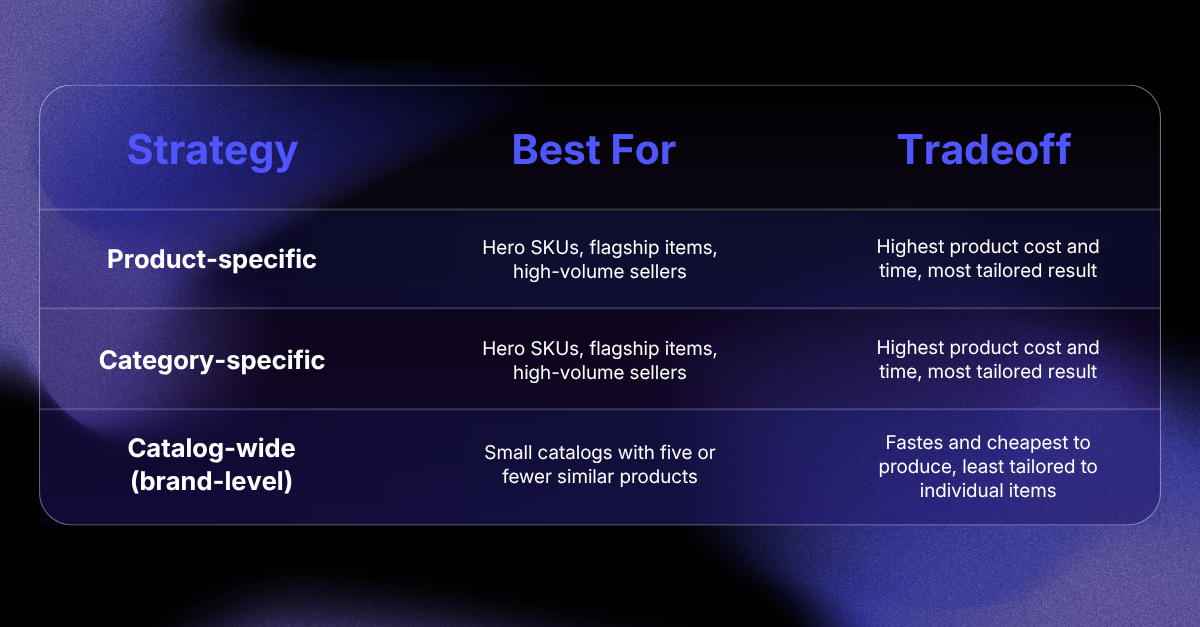
A brand with only five similar products can reasonably use the same rich media across the entire line. A brand with twenty products spread across different categories, such as soaps, shampoos, and shaving products, is usually better served building rich media at the category level instead of forcing one generic module set onto every item (Source: SellCord Walmart Rich Media Spec Sheet). The deciding factors are the depth of your catalog, how visually different your products actually are, and how much creative bandwidth your team has available.
If you are unsure where your catalog falls, start with your highest-revenue category and build category-specific content there first, then expand outward.
How to Plan a Catalog-Wide Rich Media Strategy: Step by Step
1. Audit your catalog by category, not by SKU
Before designing anything, group your existing walmart product listing inventory by category and sub-category instead of looking at individual products. This reveals natural clusters where one set of modules can realistically serve multiple SKUs, which is the foundation of an efficient walmart rich media strategy. See SellCord's full breakdown of every module type if you need a refresher on what each module can hold before you start grouping.
2. Identify your highest-impact products first
Within each category, flag the products that drive the most revenue or have the highest return rates. These are the products that benefit most from product-specific treatment, since the cost of custom content is easiest to justify where the sales volume already supports it.
3. Decide your module mix per tier
Hero products might get a full set: Feature Set, video, and comparison chart. Category-level products might get a shared Feature Set and a single comparison chart that includes every SKU in that category. Lower-volume items might only need the shared category Feature Set with no custom video.
4. Build comparison charts around cross-sell logic, not just specs
When you build a comparison chart, think about what you want the shopper to do next. If you sell across 1P and 3P, or across a parent brand with sister lines, structure the chart so it naturally points the shopper toward another one of your own products rather than just listing specs side by side.
5. Submit through an approved hosting provider
Regardless of which tier a product falls into, every module still needs to go through an approved third-party hosting provider before it can appear in the "About the Brand" section of the walmart.com product page. Walmart's Media Library guide in Seller Center outlines the submission process and technical requirements for each module type. SellCord handles this hosting directly as part of its rich media service, so sellers building a multi-tier strategy do not need to manage separate hosting relationships for each category.
6. Set a refresh cadence by tier, not a single calendar date
Hero products with custom content should be reviewed every few months. Category-level content can run longer between refreshes since it is not tied to a single SKU's lifecycle. Build your refresh schedule around the tier, not a single blanket date for your entire walmart marketplace catalog.
Common Rich Media Strategy Mistakes to Avoid
1. Building everything product-specific regardless of catalog size. This burns budget on items that do not have the sales volume to justify custom content, and it slows down how quickly a large catalog gets covered at all.
2. Treating below-the-fold length as just a content goal instead of a defensive one. Sellers who only think about rich media in terms of conversion miss the dwell time and competitor-ad-distance benefit that comes from a longer, well-built section.
3. Ignoring 1P and 3P overlap in comparison charts. Brands selling through both models often build separate, disconnected rich media for each side instead of using comparison charts to cross-sell between them.
4. Setting one refresh date for the entire catalog. Hero products and category-level content age differently. A single refresh calendar for everything means either over-servicing low-priority items or letting high-priority ones go stale. Read more on avoiding walmart listing quality score drops tied to outdated content.
5. Skipping the category audit step entirely. Jumping straight into asset production without grouping your catalog first usually results in duplicated work and inconsistent module coverage across similar products.
Frequently Asked Questions About Walmart Rich Media Strategy
Do all products need their own rich media?
No. Whether a product needs its own custom rich media depends on catalog size and category overlap. Small catalogs with a handful of similar products can share one set of modules across every item, while larger catalogs spanning multiple categories typically perform better with category-level content instead of fully custom modules on every single SKU.
Can I reuse the same rich media across multiple products on walmart.com?
Yes. Walmart allows the same rich media modules to be applied across multiple SKUs, particularly when those products belong to the same brand or category. This is common practice for sellers with smaller catalogs or tightly related product lines, and it significantly reduces production time compared to building unique content for every item.
Does rich media affect competitor ads on my listing?
Extensive below-the-fold content increases how far a shopper needs to scroll before reaching content from other products on the page. A longer, well-built rich media section keeps shoppers engaged with your brand longer, which functions as a defensive benefit on top of the conversion and search benefits rich media already provides.
How often should I update walmart rich media?
Refresh cadence should match the tier of content. Hero, product-specific modules should be reviewed every few months as products evolve. Category-level or catalog-wide content can run longer between updates since it is not tied to a single product's lifecycle, but should still be reviewed during major seasonal shifts.
Can rich media be used to cross-sell products on walmart?
Yes. Comparison charts are specifically suited for cross-selling, since they let you place your own SKUs side by side on a single product page. This works particularly well for brands selling across both 1P and 3P models, or brands with multiple product lines under the same parent company.
Treat Rich Media as a Strategy, Not a One-Time Task
A walmart rich media strategy is about more than filling in the "About the Brand" section once and moving on. Sellers who group their catalog by category, size their content investment to match product value, and use comparison charts to cross-sell between their own SKUs get more out of every dollar spent on creative production.
They also get the side benefit of keeping shoppers anchored to their own listings longer, which works in their favor against competing products on the same page.
You can track the impact of these changes directly through the Listing Quality dashboard in Walmart Seller Center under the Growth tab. As your catalog grows on the walmart marketplace, the sellers who plan rich media at the catalog level, rather than one product at a time, will scale that content far faster than the ones still building everything from scratch.
Want help planning rich media across your entire Walmart catalog? SellCord's team builds and hosts every module type, sized to your catalog and refreshed on a schedule that fits your product mix. Month-to-month pricing, no long-term contract.
👉🏻 See SellCord's Walmart rich media creation and hosting service.