
More and more shoppers are searching through AI. They ask Sparky, ChatGPT, or Gemini what to buy, and those assistants look at your full page, not just the title. That is why walmart rich media for AI search has become one of the most practical levers a walmart marketplace seller can pull right now.
Rich media has been on walmart.com for a while. What changed is how much it matters. Every module you add gives AI more information to understand your product and recommend it.
This guide covers three things: how AI reads a walmart product listing, which above-the-fold and below-the-fold modules exist, and which ones carry the most weight with AI. For more strategies like these, visit SellCord’s Walmart marketplace blog.
What Is Walmart Rich Media for AI Search?
It is enhanced listing content structured so that Sparky and outside AI assistants can read it. Examples include videos, 360 spins, FAQs, comparison tables, and feature sets. Each module gives AI more information about your product.
Rich media on Walmart shows up in two places:
- Above the fold. Videos and 360 spins sit at the top of the listing, visible the moment a shopper opens the page.

- Below the fold. Under the description, the brand highlights section holds deeper modules that tell the full product and brand story.

Both Sparky on-site and AI models off-site look at the full page, above and below the fold. Outside of the title, description, and key features, rich media is one of the most important ways to give AI more information. For a full overview of the format, see what Walmart rich media does to your listings.
Why Walmart Sparky Optimization Starts With Richer Content
Walmart sparky optimization is not one task. AI optimization breaks into three pillars:
- Win the fundamentals. Algorithms change gradually, so a product that sells well today should keep selling well tomorrow.
- Optimize on-site for Sparky. Walmart’s AI sees your full listing, your sales history, and customer purchase history.
- Optimize off-site. ChatGPT, Gemini, and Google may only see part of your page: maybe the title, maybe the images.
Rich media serves both on-site and off-site discovery. Skipping it costs you in three ways:
- Weaker search results. Rich media drives higher conversion, and higher conversion improves search results and ranking.
- More returns. Shoppers with less insight into the product are more likely to send it back.
- Less shelf space. Rich media keeps shoppers engaged on your listing longer before competitor products and ads appear.
Off-site traffic carries a bonus for every walmart third party seller. Walmart values brands that bring new customers onto the platform from outside, because it helps Walmart win the broader walmart ecommerce battle. For the full AI picture, read our guide to preparing for Walmart agentic commerce and Sparky.
What Changed in Walmart AI Search for 2026
Search has turned from a single question into a full conversation.
A shopper used to type “sunscreen” and scroll. Now they describe their skin type, what they have tried, and what concerns them, and AI recommends a product. Once on a listing page, shoppers keep asking: Does it contain a specific ingredient? Is it safe for pets or kids? What do the reviews say?
Two other shifts shape walmart 2026 planning.
Personalized results. Search, the home page, and other placements now show different products to different shoppers based on their buying history. Last holiday season, sales were spread across more products than the year before, because shoppers saw deals that matched their own categories.
Off-site influence. Many shoppers arrive already decided. They may have come from a ChatGPT conversation, a Google AI overview, or a video on TikTok or YouTube. One stat from over a year ago put roughly a third of Walmart’s referral traffic as coming from ChatGPT. Today, that path from AI conversation to Walmart listing is only becoming more common.
Above the Fold vs Below the Fold Content: What Each Gives AI
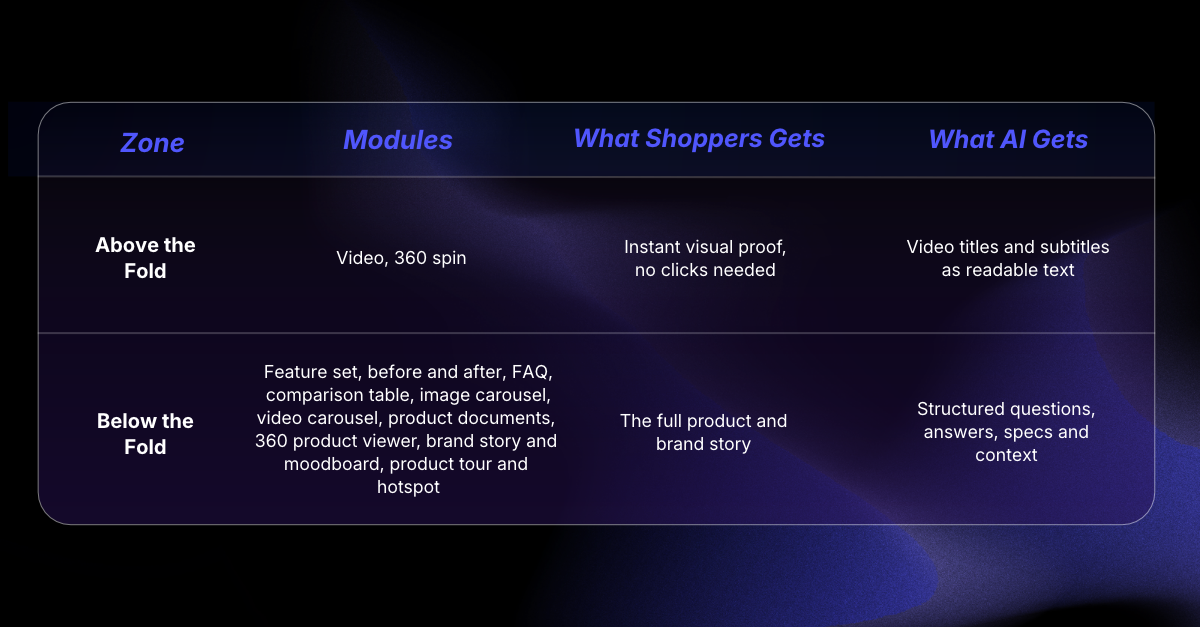
SellCord hosts 10 below-the-fold modules through Dashna. Six of them can be generated with AI from your current listing copy and imagery.
How to Optimize Listings for Walmart AI With Rich Media
The first four steps rank the modules with the most impact on AI. The last two cover modules that add depth for specific products.
1. Lead With FAQs: The Module With the Most AI Impact
FAQs are by far the most impactful module for AI search. AI works as a series of questions and answers, and an FAQ module puts that exact format on your page.
Each answer should cover three things:
- What the product is for
- Who it is best for
- What problem it solves
Write in phrases, not just keywords. Instead of “protein bar,” think “nutritious bar for children.”
The copy must stay human-readable. AI looks for human-readable content and scores listings on it. You can also adjust colors, tones, and bolding to match your brand.

2. Use a Comparison Table to Tell Your Full Catalog Story
A comparison table shows your product next to a few other products from your catalog. It tells a fuller story about who you are as a brand and who you serve.
It works especially well when you have a new launch and a strong-selling product. Use the strong seller to drive traffic to the new item. Outside of variations, which often do not make sense, there are few other ways to do this.
It also keeps more traffic on your page and your brand. Learn more about using comparison charts to cross-sell your catalog.

3. Build Feature Sets and Image Carousels for Content Depth
Feature sets. This is the most complete module and the one shoppers know best. It combines images, text, and video to explain the product or the brand.
Image carousels. These can reuse your current listing images or add new ones.
Both give AI another medium beyond the written copy. AI looks for richness in content. A detailed listing signals that the brand cared about what it put into the page, and that is the kind of product AI wants to recommend.
Six of the 10 Dashna modules can be built from your existing listing with AI generated rich media. That makes this step faster across a large catalog.

4. Add Walmart Product Video With Subtitles, Plus a 360 Spin
Video. You can host one video or 20 on a single listing, so put the most engaging ones first. Some AI models may scrape the video itself and some may not. What matters for AI is the video’s name and the subtitle file you upload with it. That subtitle file is more text AI can use to understand your product. Humans watch too, and video remains one of the best ways to connect with shoppers.
360 spin. This works across many categories. A supplement shopper, for example, can see the front and back of the bottle in one quick turn instead of clicking through images.
Video carousel. For longer-form videos, a video carousel below the fold gives them room.
5. Upload Product Documents AI Can Learn From
Product documents host PDFs such as instruction manuals or brand information directly on the listing. Shoppers get instant instructions without digging for paper inserts.
AI gets a full source of product knowledge. When AI can read your instructions, it knows how the product works and can answer more of a shopper’s questions.

6. Match the Module to the Product
Not every module fits every item. Choose based on what the shopper needs to see:
- Before and after for cleaning products, or fitness gear like a resistance band that helps with a pull-up. Sliders and colors are fully customizable.
- Product tour with hotspots for sets or multi-ingredient products. A shopper can click the yoga ball in a resistance band set, or each ingredient in a supplement.
- Brand story and mood board to show who you are, what you do, and the audience you serve.
- 360 product viewer for a more detailed spin view below the fold.

Common Rich Media Mistakes That Hurt Walmart AI Search
Skipping the fundamentals. A product that has performed well on-site for years has the best chance as search evolves into AI. Rich media builds on a strong listing; it does not replace one.
Conflicting information. Your title, description, and key features should not repeat each other word for word, but they cannot conflict. When they do, AI cannot tell what the product is and moves on.
Filling only required attributes. Walmart sends listing data to other platforms, and you do not know which attributes get sent. The more attributes you complete, the more chances you have to win. Build out a complete attribute strategy across your catalog.
Writing for the algorithm instead of people. Keyword-stuffed copy reads poorly, and AI looks for human-readable content.
Describing the product but not the shopper. AI matches products to people and situations, so every module should make clear who the product is for.
Frequently Asked Questions About Rich Media and Walmart AI
Does Walmart rich media help with Sparky and AI search?
Yes. Sparky on-site and AI models off-site both look at the full product page, above and below the fold. Rich media adds information beyond the title, description, and key features, so AI has more context to understand and recommend a product. Rich media also drives higher conversion, which improves search results. For a walmart seller, that means stronger performance in both traditional and AI-driven discovery.
Which rich media module helps Walmart AI search most?
FAQs have the biggest impact by far. AI works as a series of questions and answers, and an FAQ module places that format directly on the page. Strong answers explain what the product is for, who it is best for, and what problem it solves, in natural, human-readable language. Comparison tables follow, then feature sets and image carousels, then video and 360 spins.
What is the difference between above-the-fold and below-the-fold rich media?
Above-the-fold rich media appears at the top of the listing with no clicking needed. It includes videos and 360 spins. Below-the-fold content sits under the description in the brand highlights section. That is where the deeper modules live: feature sets, FAQs, comparison tables, product documents, and product tours. There are 10 below-the-fold modules in total, giving brands far more room to explain a product.
Do video subtitles matter for Walmart AI search?
Yes. When you upload a video, you also upload its subtitles, and that adds more text AI can use to understand your product. Some AI models may scrape the video itself while others may not, so the video’s name and subtitles do important work. Put your most engaging videos first, because shoppers watch them as well.
Does rich media reduce returns on Walmart?
Yes. Rich media gives shoppers more insight into what a product is before they buy, which leads to fewer returns. It also creates a richer, more premium experience that keeps shoppers engaged on your listing longer. That added engagement is also why rich media drives higher conversion rates, which in turn improve search results and ranking over time.
Conclusion
AI does not stop at your title. It looks at the whole page, and every module you add gives Sparky and outside assistants more reasons to understand and recommend your product.
Start with FAQs, add a comparison table, then layer in feature sets, subtitled video, and product documents. Treat walmart rich media for AI search as an extension of strong fundamentals, and give AI the most complete picture of your product.
Want expert help optimizing your Walmart rich media? SellCord’s team of Walmart specialists is ready to help you build and host the modules that feed Sparky and AI search, from FAQs to comparison tables. Explore Walmart rich media creation and hosting.